Manual controller operation guide

Watch the video tutorial
Scan the QR code on the left with WeChat or your browser to watch the related video.
Scan the QR code on the left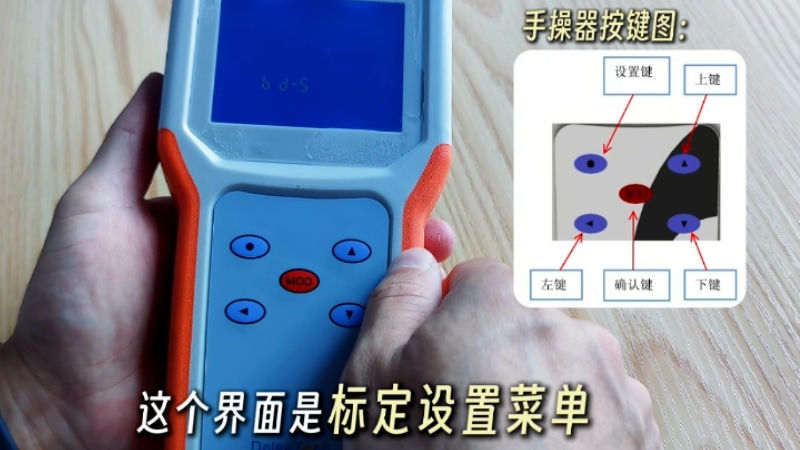
Deleetech handheld programmer operation guide for liquid level transmitter: First, connect the handheld programmer to the liquid level transmitter and press the red power button at the bottom of the handheld programmer to turn it on. After turning it on, wait patiently; when a flashing status appears at the bottom of the screen, it indicates that the device communication is successful. Next, press the round dot settings button at the top left once to activate the parameter adjustment function, then press the settings button again to enter the bd-C parameter settings menu. Then press the MOD button to enter the parameter settings page. The values displayed on the page, such as 414, represent the effective volume of the cylinder and can be modified according to the actual cylinder volume. Operation method: press the left key to shift the digits; once the digits flash, press the up key to increase and the down key to decrease the digits. After setting the unit digit, press the left key to move to the tens place; once the digit flashes, modify the corresponding value. After setting, press the MOD button to confirm. Press the left key to move to the hundreds place and adjust the value according to actual requirements, for example, setting 523. After all adjustments, press the MOD button to confirm. The effective volume setting is complete.
Then continuously press the down key on the manual controller to turn pages until the CAd d-1 0 900 interface appears. The 90 in the interface is the device increment value, which can be adjusted according to on-site requirements. For example, it can be changed to 91; the setting method is the same as for the effective volume operation. After adjustment, press the MOD key to confirm, completing the increment parameter setting. For routine debugging, only the effective volume and increment parameters need to be set. After setting the parameters, continuously press the upper left setting key to exit until the screen displays the bd-5 calibration settings menu, then press the MOD key to enter the calibration interface. The flashing value at the bottom of the screen is the real-time detected empty capacitance of the device. It is important to note that calibration must be carried out with an empty bottle. After confirming the empty bottle status, continuously press the MOD key; if YES appears on the screen, it indicates successful calibration. If YES does not appear, return to the bd-5 interface and repeat the procedure until YES is displayed. Finally, continuously press the upper left setting key to exit each level of the interface, completing the entire manual controller debugging process for the level transmitter.